

Advance tax (ennakkovero)
Advance tax — ennakkovero — is the income tax a sole trader pays through the year on projected business income. It’s one of the most common reasons platform workers feel cash-flow pressure in their first year: pay too little in advance and you owe a lump sum (jäännösvero) the next spring; pay too much and you’ve parked your money with Vero for a year. This page covers the GigBooks tools that help you stay in the middle.
How advance tax fits with VAT and YEL
Three different taxes, three different machineries, easy to confuse:
- VAT is a tax you collect on each sale and pay over to Vero per period. See VAT.
- YEL is pension insurance paid to a private provider. See YEL.
- Advance tax is your personal income tax paid in instalments through the year, based on projected business profit (not turnover).
Advance tax is the one that sneaks up. The other two get monthly attention from most users; advance tax sits in the background and reveals its mistakes 12–18 months later.
Where the estimate comes from
GigBooks supports three sources for your estimated annual tax — pick whichever matches reality:
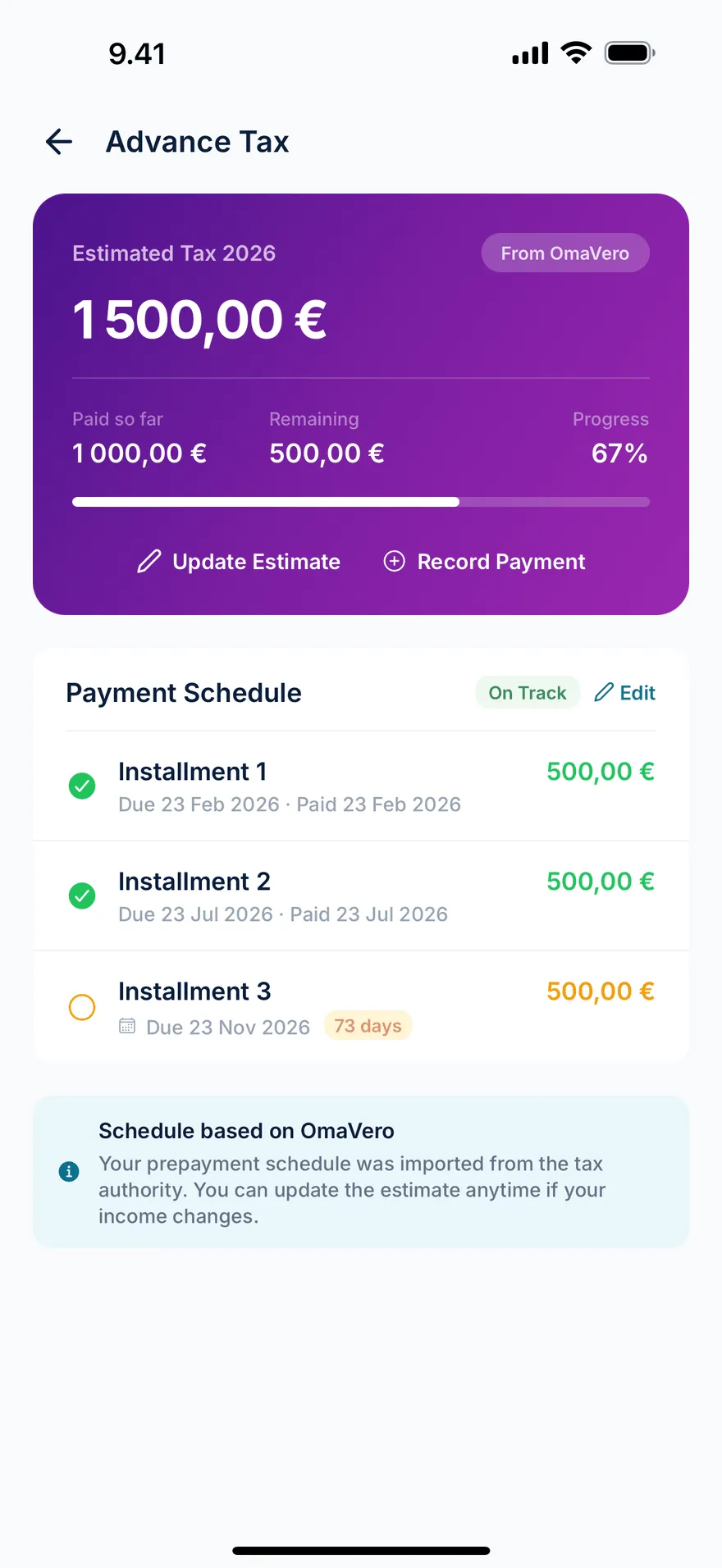
- OmaVero — Vero has set an advance-tax estimate when you registered, or you adjusted it in OmaVero. Copy the figure in.
- Accountant — your kirjanpitäjä gave you a number. Copy that in.
- Own estimate — you computed it yourself, using the estimate tool in the app’s Tax → Advance tax screen.
Whichever source you pick, the schedule and tracking work the same way.
The advance-tax compute tool
In Tax → Advance tax, the Compute tool takes a taxable income and shows:
- The estimated tax in euros.
- The effective rate (a single percentage that combines the various brackets).
Use it as a quick sanity check on the figure Vero gave you, or to forecast what next year might look like at a higher run-rate.
It uses Finnish tax brackets for the year and assumes typical sole-trader treatment. It is not a substitute for the OmaVero estimate.
Setting up an instalment schedule
Once you’ve entered your estimate, GigBooks generates a schedule of instalments. You pick the number of instalments — Vero allows different cadences depending on the size of the bill — and GigBooks splits the total evenly across them, with realistic due dates.
The defaults reflect Vero’s standard schedules:
- Two instalments — for smaller estimates, due in March and September.
- Twelve instalments — for larger estimates, due monthly.
You can also enter a custom schedule if Vero gave you specific dates and amounts (typical when you’ve adjusted your estimate mid-year).
Marking instalments paid
When you pay an instalment via your bank to Vero’s collection account, two things happen:
- GigBooks’s bank import sees the outgoing transfer (recurring payee, recurring amount) and matches it to the next pending instalment automatically.
- That instalment flips to paid, with the payment date and the linked bank activity.
If the auto-match misses (e.g., you paid from a personal account), you can manually mark an instalment paid. The dashboard’s monthly to-dos always include the next pending instalment if it’s within 30 days.
What if your year goes differently?
Almost everyone’s year goes differently from the original estimate. The Finnish system handles this in two ways:
- You adjust the estimate at any time. Open OmaVero, change the projected business income, and Vero recomputes the remaining instalments. Then mirror the new estimate in GigBooks (set the new annual figure and regenerate the schedule), so you stop paying the old instalments and start paying the new ones.
- You wait and settle in spring. If you didn’t adjust mid-year, you’ll either get a refund (if you overpaid) or a back-tax demand (jäännösvero) the following spring. Big back-tax demands earn small amounts of interest, so adjusting mid-year is usually the cheaper move when you can.
GigBooks doesn’t auto-update Vero’s estimate — you do that — but it makes the picture honest. The dashboard shows:
- Total estimated for the year.
- Total paid year-to-date.
- Remaining due.
- Whether your year-to-date business profit is trending higher than your estimate (a “you may want to update OmaVero” nudge).
What GigBooks won’t do
- Submit a new estimate to Vero. You do that in OmaVero.
- Pay the instalment from your bank. You set up a payment in your bank app to Vero’s collection reference. GigBooks reconciles when the transfer lands in your statement import.
- Compute non-typical cases (significant capital gains, foreign income, dividends as a partial owner of a company). The advance-tax compute tool assumes a pure sole-trader case. For mixed personal income situations, talk to a kirjanpitäjä.
A reasonable cadence
- Once a quarter — open the advance-tax screen, check if your year-to-date business profit is in line with your estimate. If your run-rate is 25%+ above or below the estimate, update OmaVero and update GigBooks.
- At each instalment due date — pay from your bank app. The bank import auto-matches the next time you upload a statement.
- At year-end (January–February) — note your final business profit. The annual tax-return draft uses this; any difference between paid advance tax and the final amount becomes refund or jäännösvero.
Next
- Bookkeeping basics — an overview of records and bookkeeping.
- Starting mid-year — how to align advance tax when GigBooks starts mid-year.