

VAT and the €20,000 line
VAT (arvonlisävero, ALV) is the most consequential tax decision a Finnish sole trader makes in their first year. This page explains the mechanics, what the €20,000 line means, and how GigBooks supports the workflow — without pretending it files anything to Vero for you.
The €20,000 small-business line
If your net business turnover in a calendar year is at most €20,000, you can run a toiminimi without registering for VAT. You don’t charge VAT on your invoices and you don’t deduct VAT on your business expenses.
If you cross the line during the calendar year, VAT liability starts from the sale that crosses it, not retroactively from January. That has been the rule since 1 January 2025; the old retroactive rule and the sliding relief went at the same time. You still want to see the line coming, because registration and repricing take time.
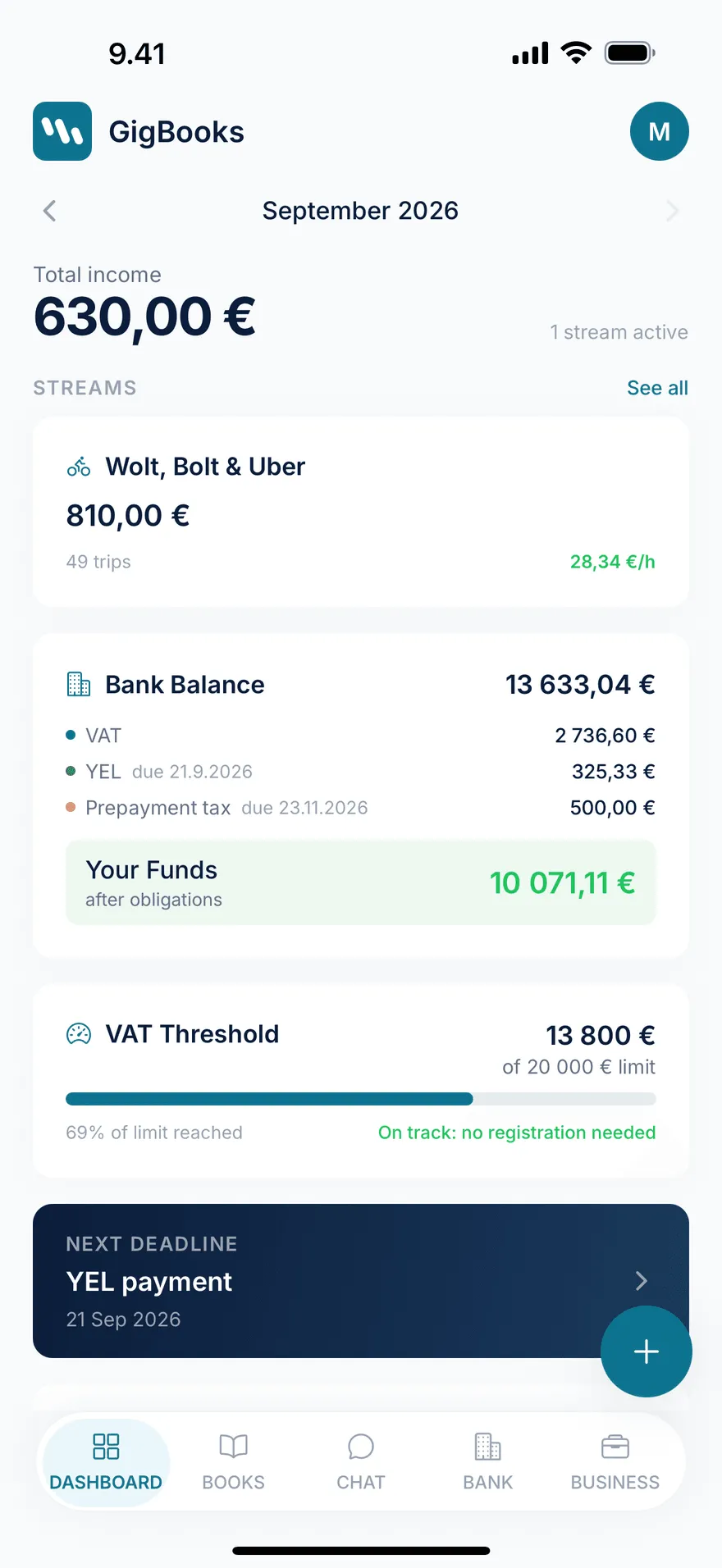
GigBooks watches this line for you. The dashboard shows three flavours of the same metric:
- Tracked so far — how much qualifying revenue you’ve booked this calendar year.
- % of line — your tracked revenue as a percentage of €20,000.
- At your current pace — when, at your last 90 days’ run-rate, you’d cross the line.
When you reach 85%, GigBooks adds a “watch threshold” todo to the dashboard so you can plan the registration calmly. Crossing the line is fine — it just means you have new admin and you need to be intentional about it.
What counts towards the line
For platform workers, the practical answer is: the gross income from your shifts and sessions, before any costs. Tips count. Platform fees aren’t subtracted before you compare to the line.
Some things explicitly don’t count towards the €20,000:
- Sale of fixed business assets (e.g., selling a car you used for the business).
- Some rental income.
- Reverse-charge VAT-exempt transactions.
GigBooks classifies entries appropriately as you add them — you generally don’t have to think about this — but if you have a complicated transaction, the chat assistant can walk through whether it counts.
VAT reporting periods
If you’re VAT-registered, you file a return for each reporting period in OmaVero. The period is set when you register; in GigBooks, you set it during onboarding (and can change it later in Settings → Business).
| Period | Who can pick it | Filing deadline |
|---|---|---|
| Annual | Most beginning toiminimi (turnover under €30,000) | The last day of February of the following year |
| Quarterly | Turnover under €100,000 | The 12th of the second month after the quarter |
| Monthly | Anyone, required above €100,000 | The 12th of the second month after the month |
Most beginner sole traders register on the annual period — it’s a single filing in February, and it leaves time to reconcile the year cleanly.
If your reporting period is monthly or quarterly, GigBooks generates a VAT period summary for each closed period showing:
- Sales VAT (the VAT you charged)
- Purchase VAT (the VAT you can deduct)
- Net VAT to file (or refund, if purchase exceeds sales)
Filing in OmaVero
GigBooks does not file your VAT return. You file it yourself in OmaVero. The flow we expect:
- Open GigBooks. The dashboard shows the period that’s now due.
- Tap VAT detail for that period. Read the sales, purchases, and net to file.
- Open OmaVero in your browser, navigate to the VAT return form, and copy the figures from GigBooks into the fields.
- Submit in OmaVero.
- Come back to GigBooks and tap Mark as filed on the period card.
Marking a period as filed:
- Locks the period’s entries — confirmed entries dated within the period can’t be edited any more (only corrected with a reversal entry).
- Updates the dashboard so the next period becomes the active one.
- Files the figures locally for your year-end summary.
VAT rates in 2026
Finland’s standard VAT rate today is 24%, with reduced rates of 14% (food, restaurant), 10% (books, accommodation, sport), and 25.5% (some specific goods). For most platform service work — courier, rideshare, hairdressing, tutoring, consulting — the rate is 24%.
GigBooks defaults a stream’s invoice VAT rate to 24%, and you can change it per stream in Settings. Receipt OCR detects the actual VAT rate from the receipt, so a fuel receipt comes in at the correct rate automatically.
VAT on your costs (deductions)
Once VAT-registered, you can deduct the VAT portion of qualifying business expenses from the VAT you owe. Examples:
- Fuel — the VAT share of every litre at a Finnish station, deductible in proportion to business use of the vehicle.
- Phone and data — the work share of your mobile bill.
- Gear — phone mounts, helmets, delivery bags, work clothes specific to the work.
- Vehicle service — oil change, tyres, brakes — work share.
GigBooks records the VAT amount on every confirmed expense and sums it into the period’s purchase VAT. The number you read off the period summary already nets your sales against your purchases.
Setup-checklist VAT step
If you’re VAT-registered when you start using GigBooks mid-period, the VAT configured step in the setup checklist asks for:
- The starting balance for the current period (sales VAT and purchase VAT already accrued before you started using GigBooks).
This makes sure when you file in OmaVero you can include both halves of the period correctly. See starting mid-year for the full flow.
What GigBooks won’t do
- Register you for VAT. That happens via YTJ at ytj.fi. Once you’re registered, switch on VAT-registered in Settings → Business in GigBooks.
- Choose your reporting period for you. It suggests annual for beginners; the choice is yours and it’s recorded at YTJ.
- Submit the VAT return to Vero. OmaVero is the system of record.
- Calculate VAT on cross-border transactions or reverse charge. Today, GigBooks supports the typical Finnish toiminimi case: domestic services, domestic costs, standard rate. If your work is cross-border (a foreign customer, an EU services purchase from outside Finland), the assistant flags it and the case is best handled with a kirjanpitäjä.
Next
- YEL — the other big Finnish entrepreneur tax.
- Advance tax — paying income tax in instalments through the year.